


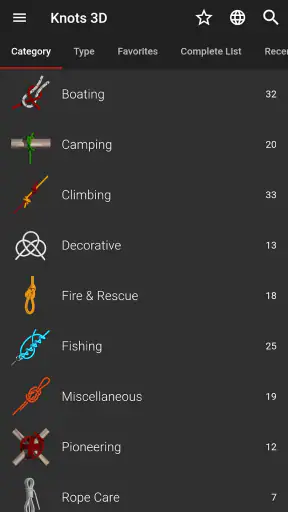
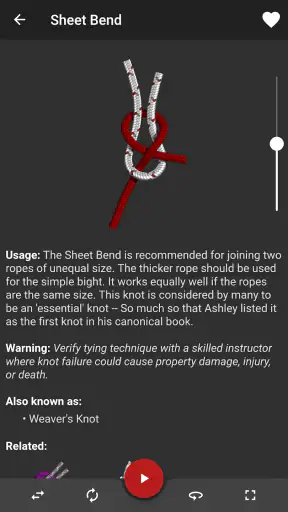
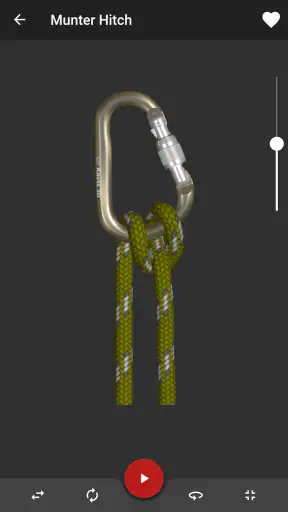
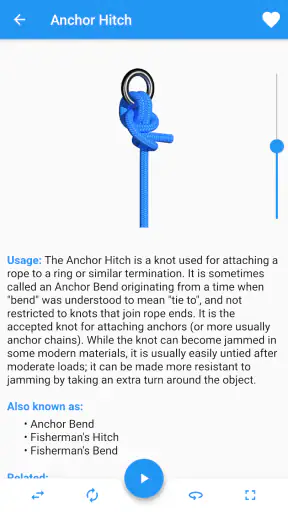
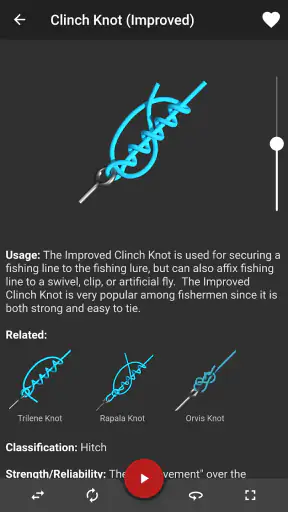
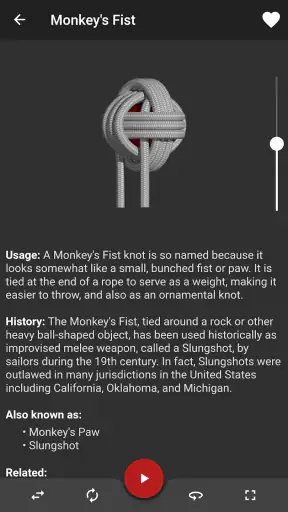
I found Knots 3D most useful when I stopped treating it like a reference book and started using it as a visual practice tool. The app focuses on learning knots through interactive three-dimensional models, which makes it far easier to understand how a rope travels than a flat drawing in a general-purpose guide. I can rotate the knot, inspect the crossings, and return to the same movement until the structure makes sense.
That approach gives the app a clear identity in the Books & Reference category. It is not trying to replace a full outdoor handbook, a sailing course, or hands-on instruction from an experienced person. Instead, it works best as a compact companion for anyone who wants to identify, study, or rehearse a broad collection of knots without carrying a physical book.
How the 3D approach feels in everyday use
The first thing I noticed was how much the three-dimensional presentation changes the learning process. With a traditional illustration, I often have to mentally imagine which strand passes over another. Here, rotating the model lets me inspect the knot from the side, the top, or underneath. That is especially helpful when two sections look almost identical in a still image but behave differently when tightened.
I would use it before a camping trip, while preparing basic boating gear, or when trying to remember a knot I learned years ago. A realistic everyday scenario would be packing for a weekend outdoors and realizing I can remember the name of a knot but not the order of the wraps. Rather than searching through several pages of text, I can open the app, examine the model, and refresh the sequence before handling the rope.
The collection is broad enough to make browsing worthwhile. The app teaches over two hundred and twenty knots, so it is not limited to the few basic examples found in many introductory guides. That breadth is valuable for curious learners, scouts, crafters, climbers studying terminology, and anyone who enjoys building practical reference knowledge.
At the same time, breadth can make the first session feel less focused. If I open the app without a goal, I may spend more time browsing names than actually learning. I get better results by choosing one purpose first: securing a load, joining two ropes, making a loop, shortening a line, or exploring decorative knots. That small change turns the app from a catalogue into a study plan.
Speed expectations and the learning rhythm
For this kind of reference app, perceived speed matters less than the smoothness of inspection. I do not need a complicated search or a long lesson to begin; I want to reach a knot, manipulate it, and move on. The 3D format naturally asks the device to display and rotate a model, so the experience is more visual than reading a plain page. On a reasonably modern device, I would expect the basic interaction to feel direct, while older hardware may make rotations feel less fluid.
The useful point is that the app does not need to be constantly busy to be valuable. A short session can be productive. I might study one knot for a few minutes, put the phone down, and try to reproduce it with actual cord. That makes the app feel efficient even when I am not browsing the full library.
There is also a practical difference between fast access and fast understanding. Finding a knot may be quick, but mastering it still depends on physical practice. The app can show the shape and help me recognize the path of the rope; it cannot create the tactile memory of tightening the knot by hand. I would therefore use it in short cycles: inspect the model, attempt the knot, compare the result, and repeat.
One tip that made the visual guidance more useful was to rotate slowly rather than constantly spinning the model. Fast movement can make the strands harder to follow. I prefer stopping at each change of direction and checking which part of the rope has moved. This is a small habit, but it prevents the 3D view from becoming a distraction.
What happens during heavier reference sessions
Heavier use would mean moving repeatedly through many entries, rotating several models, and keeping the app open while practicing. That is a different demand from reading a static article. The app has to remain responsive while I inspect details, and the device must keep displaying interactive visual content instead of only text.
In that situation, I would avoid relying on the phone as my only teacher. A better workflow is to select a small group of related knots before beginning practice. For example, I might study one loop, one bend, and one hitch, then test each with the same piece of rope. This reduces constant switching and makes it easier to notice how the structures differ.
The app is also more useful when I treat it as a comparison tool. Two knots can look similar at a glance but serve different purposes. I can rotate each model from the same angle, observe where the working end travels, and then decide which one is easier to reproduce. That kind of side-by-side thinking is more valuable than simply collecting names.
A limitation appears when the phone is being used in the place where the knot is needed. Outdoor conditions are not always friendly to a touch screen. Wet fingers, gloves, bright sunlight, or a phone placed on uneven ground can make detailed manipulation awkward. I would study the knot indoors or before starting the task, then use the physical rope as the main reference outside.
For safety-critical work, I would be especially cautious. A visual model can help with orientation, but the correct knot depends on rope type, loading direction, condition, and proper dressing and setting. I would not use an app alone to validate a climbing, rescue, or life-safety setup. In those cases, qualified instruction and established procedures are more important than convenience.
Reliability as a reference companion
Knots 3D has been available since January 7, 2012, and the current version is 11.4.1. That long presence gives me more confidence in it as an established reference than I would have in a brand-new app that might disappear after one update cycle. It is developed by Nynix LLC, and its average rating is 4.9 from around twenty-nine thousand ratings, with roughly two thousand written reviews. Those figures suggest that many users find the concept and execution dependable, although a rating cannot replace my own judgment about whether the teaching style suits me.
Reliability here has two meanings. The first is technical: whether the app opens and lets me inspect the material without unnecessary friction. The second is instructional: whether the presentation helps me understand what I am seeing. The interactive models are a strong answer to the second question because they reduce the ambiguity of flat diagrams. Still, I would verify important techniques against a trusted physical manual or instructor, particularly when the consequence of a mistake is serious.
The app’s age rating is Everyone, which fits its role as a general reference tool. I could comfortably recommend it to a family member who is learning basic rope work, provided I explain that the app teaches visual structure rather than replacing supervision. It is approachable for beginners, but its large library also gives more experienced users room to explore less familiar knots.
One recovery habit is worth adopting: if I lose track of the rope while rotating a model, I do not try to reconstruct the path from memory. I return the view to a simple angle, identify the standing part and working end again, and then follow the movement from the beginning. That makes mistakes easier to correct and avoids practicing an incorrect sequence.
The same principle applies after a break. If I leave the app for a day or a week, I would revisit the knot’s overall shape before trying to repeat every step. Recognizing the finished structure gives me a target, while the animated or interactive view helps fill in the route. This is more reliable than memorizing a long verbal instruction.
Device constraints, cost, and practical trade-offs
The app requires Android 7.0 or later, so compatibility is not aimed at the very oldest devices. The more important constraint is likely the screen itself. A larger display makes it easier to distinguish strands and rotate the model precisely, while a small phone screen can turn crossings into a visual puzzle. I would prefer a tablet or a phone with a clear, responsive display when studying complicated knots.
Because the central experience is three-dimensional, device resources matter more than they would for a text-only knot dictionary. I would expect a newer device to handle repeated viewing more comfortably than an aging handset, especially during long practice sessions. I would not choose this app for a device that already struggles with interactive visual content. On a capable phone, however, its focused design should be less demanding than using a general navigation or video app at the same time.
Battery awareness is also sensible during extended practice. I would not spend an entire afternoon endlessly rotating models if the phone is already low on power, particularly outdoors where the device may also be dealing with bright-screen use. Short, deliberate sessions are better for learning anyway, so this limitation is easy to manage.
The price is $5.99. I see that as a reasonable purchase for someone who expects to return to the reference regularly, especially if it replaces buying a separate illustrated guide for occasional use. It is harder to justify for someone who only wants to learn one simple knot once. That person may be better served by a library book, an instructor, or a free lesson from a trusted source.
The paid model changes the decision in another way: I would expect the app to earn its place through repeated use rather than impulse browsing. Before paying, I would ask myself whether I enjoy learning visually and whether I actually have a use for a large knot library. If the answer is yes, the interactive format offers something a static web page often does not. If the answer is no, the purchase may feel excessive.
Who will get the most from it
I think the strongest audience is people who learn by seeing movement. If a written instruction such as “pass the working end around the standing part” feels abstract, rotating a model can make the relationship much clearer. Beginners benefit from that immediate visual context, while experienced users can use the library to refresh forgotten techniques.
It is also a good fit for people who want a portable reference without carrying a thick book. A camper can study before leaving home, a hobbyist can check a decorative knot during a project, and a student can use it to connect terminology with physical structure. The app’s value increases when the user has cord or rope available for practice.
I would not recommend it as the only resource for professional rigging, technical climbing, rescue work, or any task where a wrong knot can cause injury or major damage. The app can support learning, but it does not provide the judgment that comes from training, inspection, and context. It is also not the ideal choice for someone who wants long written explanations about rope materials, load ratings, knot strength, or field safety.
Compared with a conventional knot book, the app is easier to manipulate and often faster to inspect from multiple angles. A book remains better for making notes, reading broader background information, and working without a charged device. Compared with short online videos, the app is less dependent on following a presenter’s camera angle; I control the view and can pause my own exploration. Videos may still be better when I want to watch a complete tying sequence at natural hand speed.
My performance verdict
After using it as a visual reference rather than expecting it to do all the teaching, I see Knots 3D as a focused and worthwhile app. Its main strength is not simply the size of its library. The real advantage is the ability to inspect a knot as a structure, rotate it when a crossing is unclear, and then take that understanding to a real piece of rope.
Its limitations are equally clear. Interactive models cannot replace touch, tension, or supervision. Small screens and older devices may make detailed inspection less comfortable, and the price is unnecessary if I only need a single basic knot. Heavy outdoor use can also be awkward when the phone is exposed to gloves, water, or glare.
For me, the best workflow is simple: choose a specific knot, examine the finished form, rotate slowly through the crossings, practice with real rope, and return to the model only when something does not match. That approach keeps sessions quick, reduces confusion, and makes the app useful beyond casual browsing.
With more than one million installs, a 4.9 average, and a mature release history, it has the profile of a well-established reference rather than a novelty. I would recommend it to learners, campers, hobbyists, and anyone who wants a visual knot library on a compatible device. I would skip it only if I prefer paper instructions, need formal technical training, or have no realistic reason to practice more than one or two knots.
My final recommendation: buy it when you want a reusable, three-dimensional study companion and are willing to practice away from the screen. That combination is where the app feels most convincing, and it is also where its speed, stability, and focused design matter most.


